FOXLEY QUALITY NAVIGATOR

From a quality problem to a traceable work plan.

A guided workspace for quality, risk and improvement cases: AI understands and explains free text. Framework Core controls the professionally permissible route, evidence boundaries and safeguards.

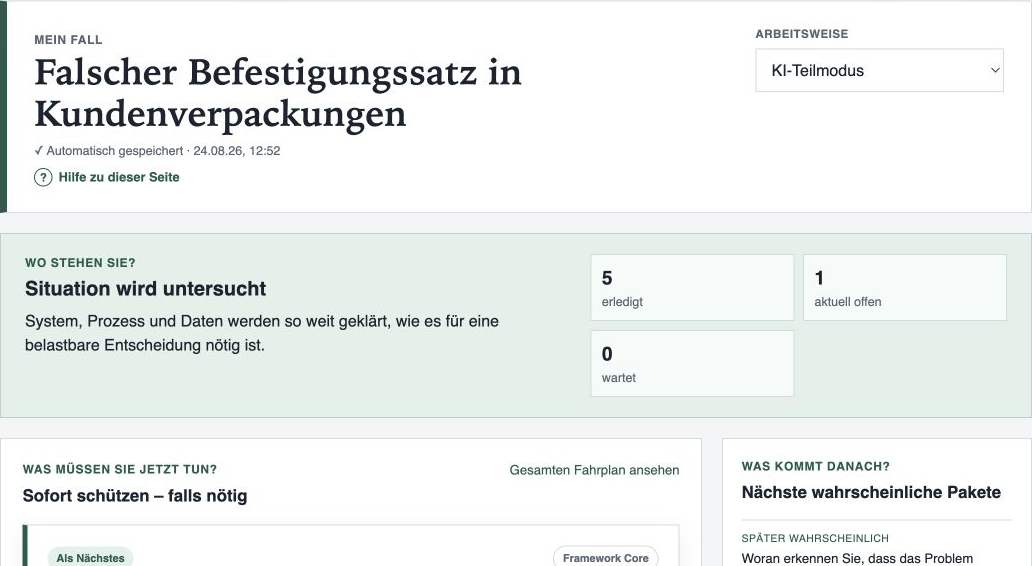
Anonymised Navigator view of a demo quality case showing progress, the current work package and likely next steps
Demo view of “My Case” with the current focus and a professionally honest preview.

FOR DAY-TO-DAY WORK

One case, two perspectives, one shared basis for action.

The Navigator shows more than the next step. It also explains why that step matters now and which information is still missing.

For quality professionals

Move from an open case description to an actionable professional route.

  • Clear follow-up questions and practical answer examples
  • A current work package with “Why now?” and an expected outcome
  • Knowledge gaps, owners and due dates in the same working context

For decision-makers

A transparent status instead of a misleading completion percentage.

  • Current maturity, blockers and likely next steps
  • Visible evidence levels, uncertainties and residual risks
  • Traceable plan changes and printable case reports

WORKFLOW

From free text to a defensible next step.

The route adapts after every new insight. Only the current work package is binding; later steps remain identifiable as a preliminary preview.

  1. Describe the case

    Capture the initial situation, objective and known facts in your own words.

  2. Review the interpretation

    Confirm, correct or add to the facts and assumptions detected.

  3. Work through the plan

    Resolve the current package and recalculate the route after each answer.

  4. Use the results

    Trace evidence, tasks, changes and open risks in the report.

PRODUCT VIEW

What the Navigator makes visible within a case.

These views come from a fully prepared demo case. They show functionality available in the current private beta.

01

Guided quality dialogue

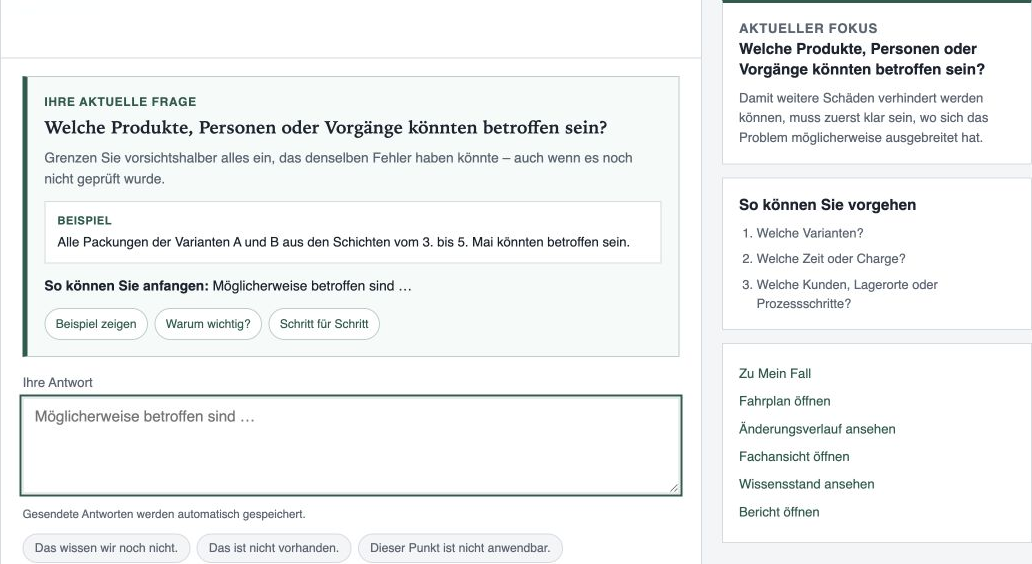
The Navigator connects the current question with case progress, explains the focus and shows a preliminary route. Answers can be revised later.

Anonymised quality dialogue with case status, preliminary work plan and next professional question
Dialogue and work plan remain connected instead of becoming separate checklists.
02

Adaptive work plan

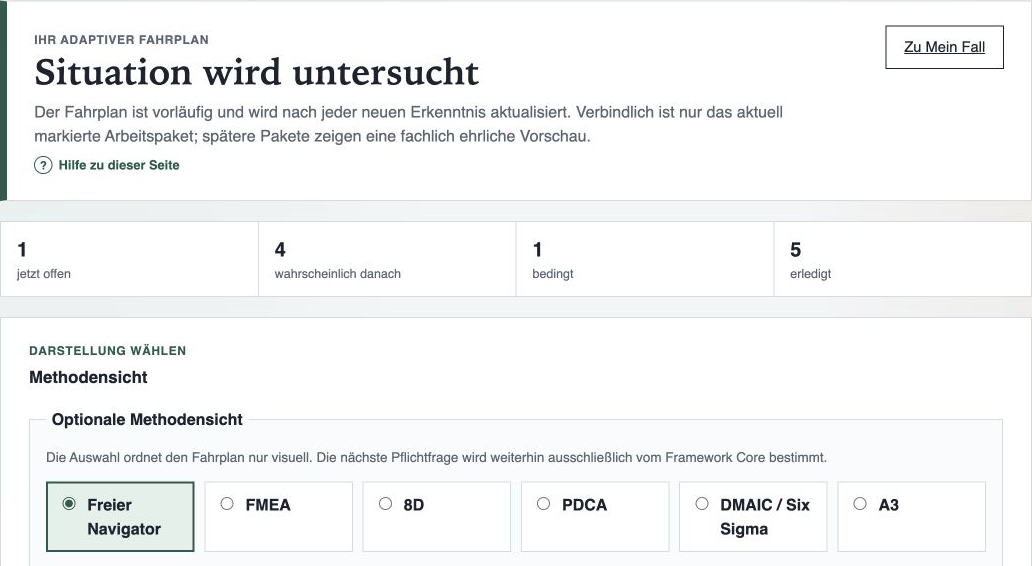
Work packages are marked as required now, likely next or conditional. An optional method view adds another way to organise the same case.

Adaptive work plan with progress and method views for FMEA, 8D, PDCA, DMAIC and A3
The method view structures presentation; Framework Core still determines the next mandatory question.
03

Traceable report

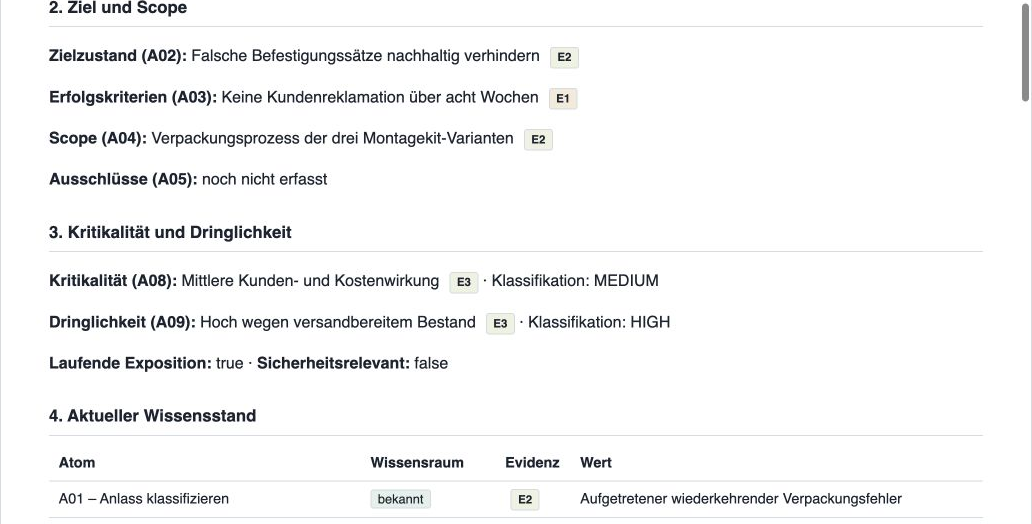
Initial situation, objective, scope, classification, knowledge status, tasks and open uncertainties are connected in a printable case summary.

Excerpt from an anonymised Navigator report showing the initial situation, objective, scope and criticality
The report documents current knowledge without replacing professional approval.

USE CASES

For reactive, preventive and data-rich cases.

The Navigator does not force one standard method onto every case. It structures the necessary clarification and supports suitable method views.

REACTIVE

Quality issue or complaint

Define potentially affected products or activities, prioritise protection and prepare the cause route.

PREVENTIVE

Risk or development case

Put criticality, risks, evidence, residual risks and verification into a defensible sequence.

IMPROVEMENT

Chronic process problem

Connect measurement confidence, patterns, causes, interventions and sustained effect.

Optional method views

FMEA, 8D, PDCA, DMAIC / Six Sigma and A3 organise the work plan visually. They replace neither Framework Core routing nor professional judgement.

  • FMEA
  • 8D
  • PDCA
  • DMAIC / Six Sigma
  • A3

SAFEGUARDS

AI for language. Framework Core for routing. People for decisions.

The Navigator deliberately separates language support, professional routing rules and human approval.

AI language layer

Understands free text, formulates clear questions and explains existing routing decisions.

Framework Core

Controls mandatory steps, evidence boundaries, risk gates and the adaptive sequence deterministically.

Human responsibility

Confirms interpretations, evaluates results and makes every approval or professional decision.

PRIVATE BETA

Protected workspace for personally invited pilot users

Each invited person receives an individual account and can access only their own cases. Public registration is not available.

The protected Navigator is available to configured pilot accounts.

FREQUENTLY ASKED QUESTIONS

What prospective pilots should know in advance.

Which cases is the Navigator suitable for?

Quality, risk and improvement cases where the initial situation, evidence, next steps and decisions need to be structured traceably.

Does the Navigator replace FMEA, 8D or other methods?

No. FMEA, 8D, PDCA, DMAIC / Six Sigma and A3 are optional method views. Framework Core continues to determine the professionally permissible next step.

Which data may be used in the private beta?

Only test, demo and fully anonymised content. Personal, confidential or real customer data is not permitted.

Is the Navigator available in English?

The information page is bilingual. The protected application and its help are in German during the current private beta.

How can I receive pilot access?

Pilot accounts are configured personally. An email request should briefly describe your role, organisation and a fully anonymised test case.

Does the Navigator make approval decisions?

No. It structures the case and makes reasons, uncertainties and residual risks visible. Professional judgement remains with people.

PILOT PHASE

Explore the Navigator with an anonymised quality case.

Briefly describe your role, organisation and the fully anonymised test or demo case you would like to examine.

Request pilot access by email